
If you have a discount coupon for your next purchase, you must first activate it in your customer area. To activate it, go to the "Discount Coupons" section and enter the promotional code received.
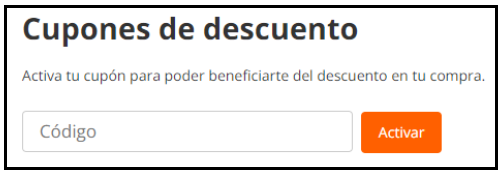
Once activated, you can proceed with your purchase and select the available coupon in the second step of the purchase process.
You will see a dropdown indicating "Available Promotions". Click on this dropdown, and you will be able to choose your promotion.
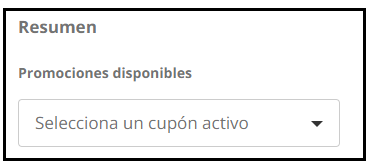
Please note that promotions are not cumulative. If you have several active promotions in your customer account, you can only redeem one per order. The promotion is only applicable to items sold by PcComponentes and cannot be applied to items from sellers on our Marketplace. The digital levy is not taken into account when calculating the minimum purchase amount, so if you are buying a product such as a USB drive or a hard drive, please keep this in mind.